
EGG Display Settings
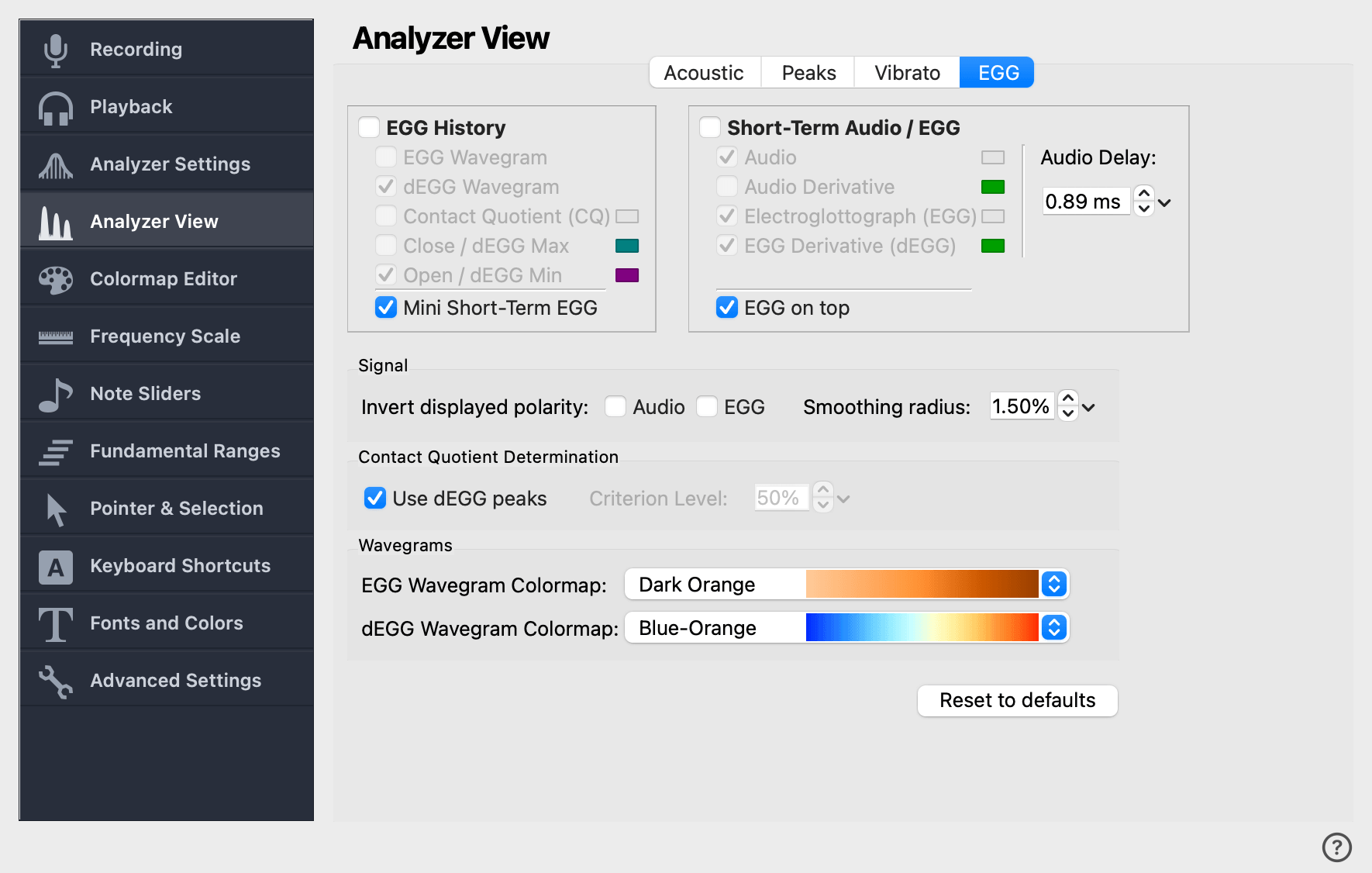
This page controls the appearance and behaviour of the Electroglottograph (EGG) display, including the long-term EGG history, the short-term audio/EGG view, the polarity and timing of the signal, the Contact Quotient calculation, and the Wavegram colormaps.
|
Available in VoceVista Pro
The EGG features are only available in VoceVista Pro. See our products page for a comparison of the different editions. |
EGG History
The EGG History is the long-term EGG view, equivalent to the spectrogram for audio: it shows how EGG-derived measurements change over time. The checkboxes inside this group choose which curves and diagrams are drawn, and a color button to the right of each line choice sets that curve’s color.
- Contact Quotient (CQ)
-
Plot the Contact Quotient over time. The exact CQ method used is configured in the Contact Quotient Determination group below.
- Close / dEGG Max
-
Plot the position of the dEGG maximum (the moment of fastest contact) for each glottal cycle.
- Open / dEGG Min
-
Plot the position of the dEGG minimum (the moment of fastest de-contact) for each glottal cycle.
- EGG Wavegram
-
Show the EGG Wavegram — a stacked plot of one EGG cycle per row, colored by amplitude with the colormap chosen below.
- dEGG Wavegram
-
Show the same kind of stacked plot using the derivative of the EGG signal, which highlights the contact and de-contact events.
- Mini Short-term EGG
-
Show a small short-term EGG view inside the EGG History area in addition to the main Short-Term view. This is convenient when you want to compare a few cycles in detail without giving up the wider EGG History.
Short-term Audio / EGG
The short-term EGG view shows a few periods of the EGG and the audio signal at the current cursor position. It is the EGG counterpart of the short-term spectrum.
Pick which signals to display:
- Audio
-
Display a few periods of the audio channel.
- Audio Derivative
-
Display the derivative (rate of change) of the audio signal.
- Electroglottograph (EGG)
-
Display the EGG signal.
- EGG Derivative (dEGG)
-
Display the dEGG, the derivative of the EGG signal. The dEGG emphasizes the moments of fastest contact and de-contact, which are often the cleanest landmarks in a glottal cycle.
Audio Delay
A time offset (in milliseconds) applied to the audio signal to compensate for the delay between EGG and microphone recordings. EGG electrodes pick up vocal-fold contact almost instantaneously, while microphone audio arrives slightly later because sound has to travel through the vocal tract and air to the microphone. Adjust this until the EGG and audio peaks line up the way you expect them to.
Signal
Invert displayed polarity
Invert the displayed polarity of either signal on the Short-Term view.
- Audio
-
Flip the audio waveform vertically.
- EGG
-
Flip the EGG signal vertically. EGG hardware sometimes outputs the signal with the polarity reversed (closing-as-downward instead of closing-as-upward); use this checkbox if the EGG curves point the wrong way for your hardware.
Smoothing radius
Smoothing applied to the EGG signal before its derivative is computed, expressed as a percentage of the cycle length. A small amount of smoothing helps suppress noise that would otherwise produce spurious peaks in the dEGG. Too much smoothing blurs out the very events the dEGG is meant to highlight.
Contact Quotient Determination
The Contact Quotient (CQ) is a measure of how much of each glottal cycle the vocal folds spend in contact. A CQ of 50% means contact for half the period; 25% means contact for a quarter of the period. Note that EGG cannot give a complete picture of vocal-fold closure — it can only indicate that contact has increased. The term Contact Quotient is preferred over Closed Quotient for that reason.
The two controls in this group choose which method is used.
Use dEGG peaks
When checked, the contact and de-contact instants are taken from the peaks in the dEGG. The contact instant is the dEGG maximum (steepest rise); the de-contact instant is the dEGG minimum (steepest fall).
When unchecked, the contact instants are determined by the Criterion Level (described below) instead.

Criterion Level
When Use dEGG peaks is unchecked, the Criterion Level draws an imaginary line across the EGG signal: parts above the line are counted as closed, parts below as open. The CL value is the threshold’s height on the EGG signal, expressed as a percentage between the cycle’s minimum and maximum.
A CL of 50% places the threshold halfway up; a CL of 35% places it lower so a larger portion of each cycle is counted as closed. The default is somewhere in between; the optimal value depends on the recording and the speaker.
You can also drag the criterion-level line directly on the EGG display.
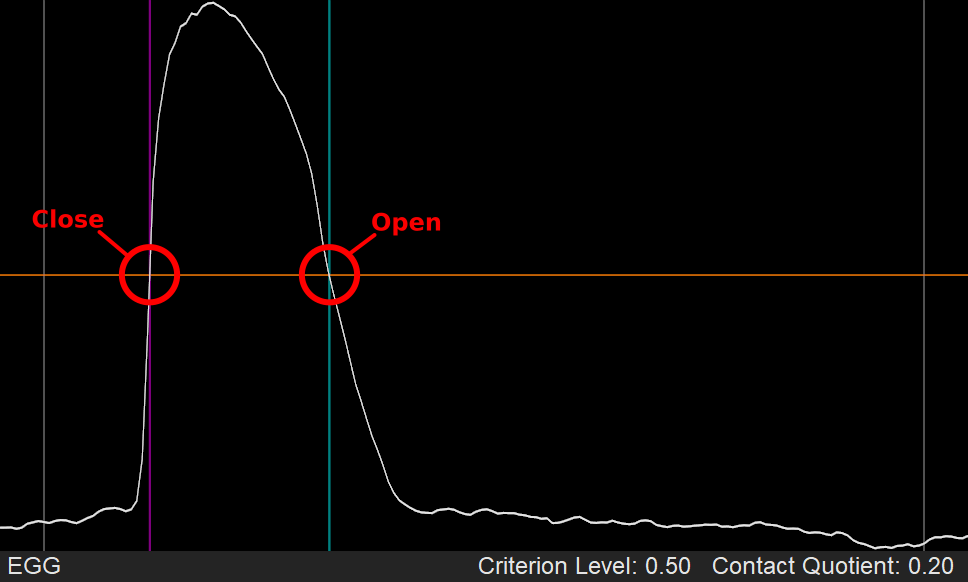
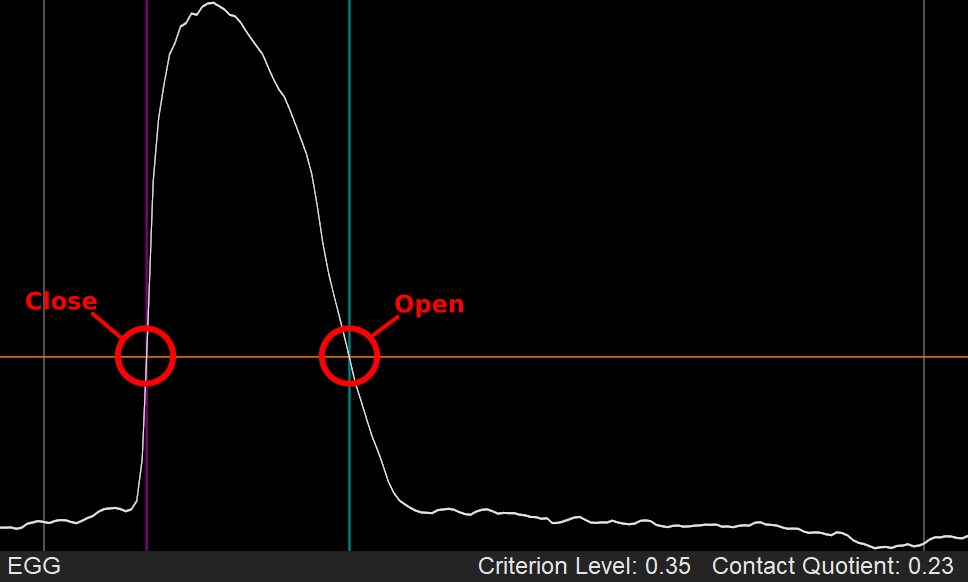
The Criterion Level is generally less accurate than the dEGG-peaks method on a clean signal, but it is more robust to noise: the dEGG method requires sharp, identifiable peaks, which a noisy signal may not provide.
|
A hybrid mode — close from dEGG max, open from Criterion Level — is useful when only the rising flank of the dEGG is clean. When Use dEGG peaks is unchecked but the criterion level is high enough that above-line is short, the result approximates this hybrid behaviour. |
Wavegrams
EGG Wavegram Colormap
Choose the colormap used to color the EGG Wavegram. The dropdown lists the available colormaps; the same options are managed on the Colormap Editor page.